App Router
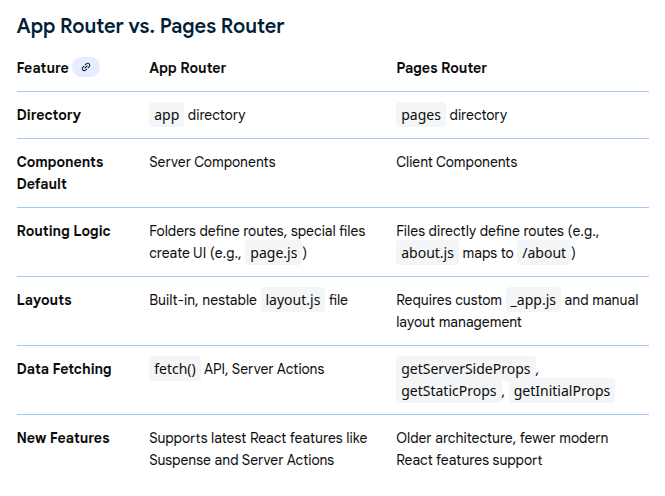
The Next.js App Router is a modern, file-system based routing solution built on React Server Components (RSCs). Introduced in Next.js 13, it is the recommended router for new
applications due to its advanced features, flexibility, and performance optimizations over the older "Pages Router".
Key Features and Concepts
- File-System Routing: Routes are defined using folders within an app directory. Each folder represents a URL segment, and special files within the folders are used to create the UI for that route.
- React Server Components (RSCs) by Default: Components in the app directory are automatically treated as Server Components, which run on the server. This improves performance by reducing the amount of client-side JavaScript, enabling faster initial page loads and better SEO. You can use the "use client" directive to explicitly mark components that require client-side interactivity (like state or event handlers).
- Nested Layouts: The App Router simplifies shared UI components (like headers or sidebars) with layout.js files. Layouts can be nested, and only the specific page content re-renders during navigation, preserving the layout's state.
- Data Fetching: Data fetching is simplified. You can use the native fetch() API directly within Server Components, which offers automatic caching and revalidation options.
- Loading States and Error Handling: The loading.js file automatically creates a loading UI (wrapped in a React Suspense boundary) while a route's content is being fetched on the server. Similarly, error.js defines error boundaries for granular error handling.
- Streaming: The router supports streaming server-side rendering, which allows parts of the page to be sent to the browser as they are ready, improving perceived performance and Time To First Byte (TTFB).
- Advanced Routing: It enables complex routing patterns such as parallel routes (showing multiple independent pages in the same view) and intercepting routes (loading a route in the context of another, e.g., a modal).